button home button products button support button news button club

Around the World

If it isn't plain to see yet, it soon will be: all Internet business is global. You can download Morning Flight to a PC in London or Rio just as easily as you can download it in New York. It's free, so even customs duty and taxes are out of the picture.

More to the point, it makes sense. Morning Flight will function as well in London or Rio as it does in New York! Switching from inches to millimeters, from U.S. to ISO sizes, from dollars to euros, it's all just a click away.

top of page | Who we are | Contact us | Privacy Policy

Click the Image for a Flash Demo

1.5 MB
Morning Flight Quote Screen

Want to quote offset and digital printing while your customers are still on the phone? Download Morning Flight. This popular MS Windows software from PrintFire is so quick and easy to use, you'll never again calculate printing prices the old-fashioned way. And it's affordable. There's even a free version . . . free to download, yours to keep!

Click the buttons on the screen below

Forever-Free Edition

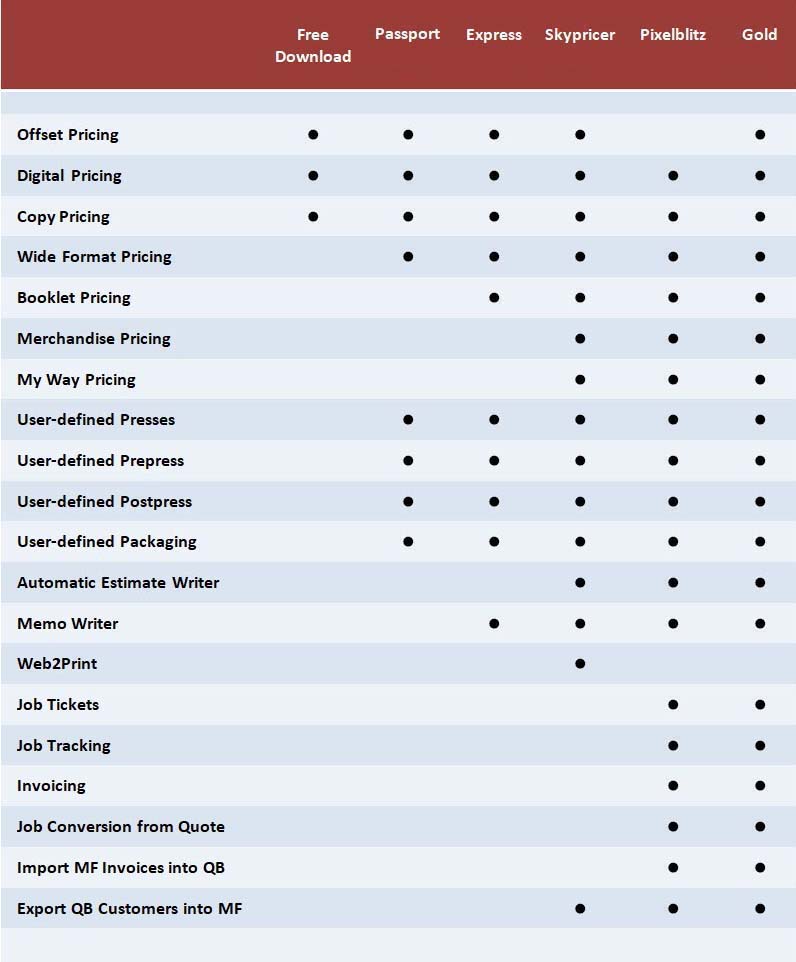
The Free Edition includes all the features you need to make pencil and paper quotes in your Offset/Copy/Digital Print Shop a thing of the past. Download it today and move your pricing into the 21st Century! Not a trial or a demo but a bona fide free program . . . yours to keep!

Silver Edition Demo

The Silver Edition adds a Booklet Module, Merchandise Pricing, fully automatic Estimate Writer, and a host of other features. Available now at the Printfire Store for $285.00 U.S. The demo version has a working limit of 10 customers. It may be used for an unlimited period.

The Free Edition will be free forever from this web site. Prefer not to download? Order it as the boxed Passport Edition with a 208-page printed user manual and bonus features from the Printfire Store.

Just $48.00

Morning Flight is all about speed and pushbutton automation. As you'll see in this demo, estimating the price of printing has never been this quick or cousin-Mel-could-even-do-it easy.
Overview
3.7 MB Flash Demo, best viewed at 1024 x 768.
Quoting Printing
Make your first quote. This simulation will teach you, step by step, how to quote a basic 2-color stationery package.
4.8 MB Flash Simulation, best viewed at 1024 x 768.
Select a Product
Enter a Special Product
What Morning Flight users are saying on mymorningflight.com:

I have been downloading demos of estimating programs for the last month or so but every program up until now has either been too complex for my people to learn easily, or too simple. Morning Flight is the best I have seen to fit into my work flow so far. I love the interface of this program. I look forward to playing around with it a little each day to get it ready for my office staff. - Florida

I have to tell you I am using Morning Flight to estimate 99.5% of everything we are doing. It seems to be working out very well and I am extremely happy! The remaining .5% seems to be booklets, which I'm still doing by hand. I am spoiled by the automation of Morning Flight. This product is just what we were looking for (I'll be passing the word around). I think you have hit the nail on the head! - Ohio

Have really been looking at different software packages over the last several months, came across Morning Flight by accident and thus far, love it. Has good features, but most of all it is very easy for our staff to use. And just as a note, we really love the interface; don't know really how to put this, but most software is hard and angular, your interface has a nice 'soft' feel about it and seems to help in its intuitive nature of operation. - Alabama

I am very impressed with Morning Flight so far. Will the price really only be around the $300 US mark when it is out of beta stage, or will it end up like most other estimating software, way too overpriced? - Australia

Click the images on the left to play demos
Click the images on the left to play simulations
Select a Paper
Set the Printing Configuration
Set Quantities
Enter Ink Colors
Enter a Special Paper
Enter PrePress items
Enter PostPress items
Select or add a Customer
Enter a Keyword/Notes
Import a Pricesheet for editing
Read me
V2010.1
Read me
V2010.1